Product Corner Tips

Unlock tips, tricks, and hidden features
you might not know about MetaVision

btn-icon Book a demo
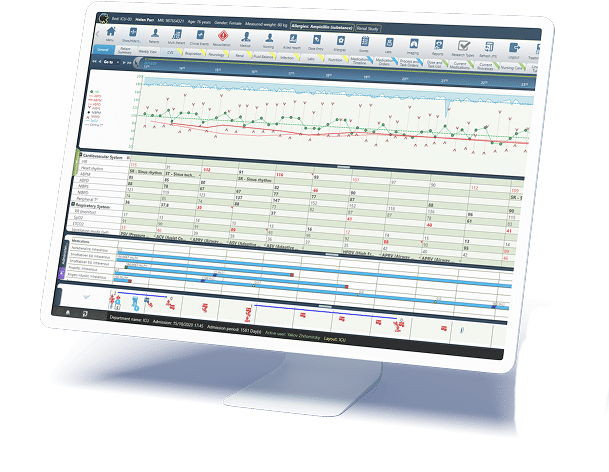
MetaVision clinical information system displaying patient vitals, medications and trends

Pattern Orders Display in Order Profile

Pattern based orders – cyclical, complex, or multidose schedules are now display in an expanded, structured layout directly in the order profile. Clinicians can easily expand or collapse the full pattern to review timing, frequency, and dose breakdowns.

  • Improves visibility of multiday and repeating schedules
  • Reduces misinterpretation of complex regimens
  • Customizable default expansion behaviours
  • Available from MetaVision version 6.24

Tip: Use expanded view when validating, for instance, antihypertensive therapy plans, loading and maintenance plans for antibiotics, and tapering plans for hydrocortisone.

Renew Orders Using Most Updated Patient Weight

This feature ensures that when renewing weight-based orders, the system automatically recalculates the dose using the most recently documented patient weight. By applying the latest available data at the time of renewal, it supports dosing accuracy and helps maintain alignment with current clinical parameters.

  • Ensures accuracy for weight-sensitive orders
  • Presents the most updated weight, ensuring that orders and doses are synchronized with the latest values
  • Available from MetaVision version 6.21

Tip: Encourage staff to record weight changes promptly - the renewal engine depends on having the most current value available

Plan Future Dose/Rate Changes

Clinicians can now schedule dose or rate adjustments in advance, ensuring therapies stay aligned with protocols without requiring manual intervention at inconvenient times.

  • Enables proactive management of therapies
  • Ensures compliance with protocols that require modifications in future rates
  • Available from MetaVision version 6.22

Tip: Ideal for steroid infusions or scheduling nocturnal dose reductions without requiring a manual intervention at odd hours.

Automatic Reassociation of Pumps Without Drug Library

This feature enables automatic pump re-association even when no drug library is available, ensuring continuous data-capture during pump swaps or temporary disconnections, helping prevent documentation gaps and workflow interruptions.

  • Reduces interruptions during patient transport or pump exchange
  • Prevents interruptions in pumps documentation
  • Available from MetaVision version 6.21

Tip: Use this feature during rapid equipment turnover - no need to reassign pump IDs manually.

Non-modal Order and Dose Entry

This feature introduces non-modal Order Entry and Dose Entry windows, allowing clinicians to interact with other parts of the system while entering orders or doses and supporting more efficient multitasking and workflow continuity in fast-paced clinical environments.

  • Gives dynamic support for workflows where a deeper understanding of patient history and condition is necessary to establish the correct order plan and/or dosing
  • Optimizes order workflows and multitasking by removing the need to perform intermediate notation of the patient’s state.
  • Available from MetaVision version 6.24

Tip: Open patient history alongside order entry to check previous treatments while prescribing.

LDAPS Support

This feature adds LDAPS (LDAP over SSL) support, providing encrypted authentication traffic for more secure and compliant user access.

  • Strengthens security and compliance
  • Encrypts authentication traffic
  • Available from MetaVision version 6.20

Tip: Recommended for hospitals aligning with updated IT hardening baselines.

Customizable Dose Label Printing

This feature allows clinicians to generate and print individual or batch barcode labels directly from the Dose Task List, streamlining medication preparation and supporting more efficient, accurate dispensing workflows..

  • Supports pharmacy and nursing workflows
  • Adapts to various dispensing models
  • Available from MetaVision version 6.21

Tip: Use combined dose labels for batch preparation of non-infused doses such as pills to reduce handling time.

Body Map

The Body Map feature provides a patient-specific visual interface displaying all active lines, drains, tubes, wounds, and devices, giving clinicians a clear overview to support situational awareness and reduce errors.

  • Helps clinicians see “everything attached” at a glance
  • Reduces line‑mix‑ups and improves situational awareness
  • Available from MetaVision version 6.21

Tip: Use during shift handover to rapidly confirm line placement without navigating multiple sections.

Tabular View – Set Normal Values Per Patient

This feature allows clinicians to set patient-specific normal ranges that display in tabular views, helping reduce alert fatigue and ensure notifications reflect clinically meaningful thresholds.

  • Ensures that alerts are relevant to a patient's specific condition and needs
  • Reduces unnecessary alerts and review noise

Tip: Customize ranges for patients with neurological issues for whom you wish to maintain a blood pressure level that would be too low for other patients.

Undo Last Action on Continuous Dose

This feature allows clinicians to instantly undo the last adjustment on continuous doses, supporting better control over medication administration and reducing the risk of errors from incorrect dose changes, while keeping workflows smooth and accurate..

  • Supports rapid correction without recreating the dose
  • Limitations apply when pumps are connected (pump remains the source of truth)
  • Available from MetaVision version 6.24

Tip: Use immediately after selecting the wrong action or inserting an incorrect value - no need to delete the entire dose.

© 2026 iMDsoft. All rights reserved.